Reflection.js for mootools

Reflection.js for jQuery

Version: 1.03
Category: jQuery Javascripts

Introduction

This is an improved version of the reflection.js script rewritten for the jQuery javascript library. It allows you to add instantaneous reflection effects to your images in modern browsers, in less than 2 KB.

Demo

BlocksiMac

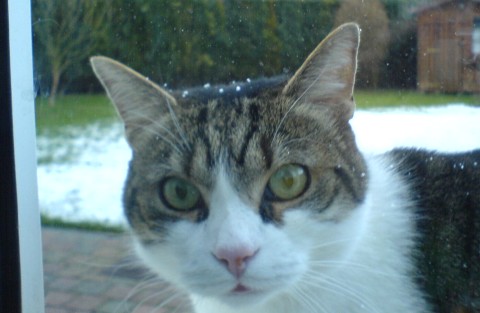
Arthur in the garden

Features

Compared to the original reflection.js, this script has the following added features:

Performance

Like the original reflection.js, this script is much faster than the script.aculo.us Reflector script (which is not suited for production use), because it does not create a large number of image zones (one for each pixel line). Instead, it uses the canvas tag available in most modern browsers, and DirectX image transformation filters in Internet Explorer, so the reflection image is drawn natively in one step.

Compatibility

This script works in all browsers supporting the canvas tag: Firefox 1.5+, Opera 9+, Safari 2+, Camino and Google Chrome. It also works in Internet Explorer 6+ by using an alternative drawing technique.

In older browsers, the script will degrade automatically (the images will remain untouched).

WARNING
Firefox 2.0.0.10 broke the canvas.drawImage() javascript function and therefore this particular version does not work with this script. Firefox 2.0.0.11 and more recent will work.

It works with all image formats, but reflections of animated GIFs will not be animated: the first frame will be used for the reflection. There is no way to make a dynamic animated reflection for GIF images using javascript.

Requirements

Reflection.js for jQuery (obviously) requires the jQuery library, version 1.2.3 or more recent.

Usage

Setup

Just include the script in the header of your page, after the inclusion of the jQuery library:

<script type="text/javascript" src="js/jquery.js"></script>
<script type="text/javascript" src="js/reflection.js"></script>

Adding reflections

Reflections can be added to any image tag over any kind of background (even image backgrounds!). There are two ways of adding a reflection:

1) Using HTML, by applying a CSS class named “reflect” to your images:

<img src="test.jpg" alt="" class="reflect" />

This will use the default reflection parameters (see below). You can apply multiple classes to an image (separated by spaces), the script will detect if “reflect” is one of them.

2) Using javascript, by calling the reflect() method on a jQuery selector. Examples:

$("#photo1").reflect(options);

or

$("#gallery img").reflect(options);

“options” is an optional argument similar to the other options arguments in jQuery. The following options are available:

If you call this method more than once for the same image, the previous reflection will be automatically replaced by the new one.

Important: If you use javascript to add the reflection effect, you can call these methods either as soon as the DOM is ready (using the jQuery function) or by placing the call directly in a javascript block below the image you want to reflect. You don’t need to delay the call after the window “load” event. Your images will appear reflected as soon as they complete loading, even if they were not fully loaded when the javascript method was called. This is the main difference between this script and the original reflection.js.

Removing reflections

You can remove a reflection using javascript, by calling the unreflect() method on a jQuery selector. Example:

$("#photo1").unreflect();

CSS limitations

When adding the reflection effect, the script wraps the image inside a <div> block and adds the reflection to the same block, just below the original image. The class and style attributes of the image will be set blank and applied to the div instead, so the whole block will show like the original image. This operation is reverted when removing the reflection.

This means that you can style the mirrored images using CSS classes and using their style attribute, but you can not style the img tag directly.

For example, when reflected, the following image will not display properly because it is using a CSS rule mentioning the img tag:

CSS:

#content img {
   float: left;
   margin: 20px;
}

HTML:

<img src="..." alt="" class="reflect" />

Instead, you must use a CSS class without referring to the img tag (or use the style attribute) and it will display like expected:

CSS:

#content .leftimage {
   float: left;
   margin: 20px;
}

HTML:

<img src="..." alt="" class="leftimage reflect" />

Also, the reflection will display properly with block-style images, but not with inline-style images. If you apply it to an inline-style image, it will be transformed to a block-style image. Most websites use only block-style images, so it should not be a problem.

Finally, you must not specify the height of the reflected image using a CSS class or style property, because the height will increase when the reflection will be applied. Set the width and height attributes on the <img> tag instead if you want to (it’s optional).

Download

Reflection.js for jQuery is free software released under MIT License.
If you like it, talk about it and promote it by linking to this page.

reflection-jquery.zip [2.70KB]
Reflection.js for jQuery v1.03
Last updated: 21.11.2009 02:29
Downloads: 6964

Changelog

v1.03 (2009-11-21)

v1.02 (2008-12-17)

v1.01 (2008-12-16)

v1.0 (2008-12-15)


Your opinion about this software?

  1. Looks very handy! Thanks for sharing.


    Rob    16.12.2008 10:30    #
  2. Great, really useful as it degrades nicely in old browsers.
    Thanks!!


    Rob    16.12.2008 10:44    #
  3. Lovely!
    However I am wondering if it is possible to add a small space fe. 2px between the picture and its reflection. Designwise this would look more natural.
    Cheers, Dick


    — Dick Dekker    16.12.2008 22:32    #
  4. Hello Dick,

    Thank you for your suggestion. In the new release I’ve just uploaded, the “reflected” class is applied to the img tag when the image is reflected. So, you can add a 2px space between the image and reflection by adding the following rule to your CSS:

    img.reflected {
    margin-bottom: 2px;
    }

    However if you do this, the reflection will be truncated by 2px at the bottom because the total height of the box is fixed to be: image height + reflection height. The height of the box must be fixed to prevent a problem with Internet Explorer: a huge margin taking up space at the bottom of the reflection.


    Christophe Beyls    17.12.2008 02:41    #
  5. Looks GREAT in IE 7! Doesn’t seem to work correctly on Chrome. Even your demo page doesn’t render correctly.


    — marvin    19.12.2008 05:35    #
  6. Nope, it works fine in Chrome, at least in the final version (1.0.154.36). Something must be broken in your Chrome browser.


    Christophe Beyls    20.12.2008 06:49    #
  7. Excellent!

    Works great on Chrome, FF2, FF3, IE7, IE8

    I don’t have IE6 to test….


    David Hale    03.01.2009 20:10    #
  8. I’m happy to read that it works in IE8 Beta because I have not tested it (I only test non-beta browsers). I’ve read that Microsoft made some breaking changes regarding opacity emulation in IE8 so I was afraid that these changes could break the reflection effect too.

    I test IE6 (first version) in a virtual machine and it works.


    Christophe Beyls    04.01.2009 00:04    #
  9. I was wondering if there is a known way to overlay some text over the reflected bit. I tried a div with absolute positioning and a negative margin-top, which worked to a degree – the div was indeed placed over the reflection. However, the left edge of the div was aligned with the center of the reflection rather than the entire div being centered with the center of the reflection.

    Tried playing with a few other attributes on the text div (float, relative position, etc) but never found anything that successfully centered text on top of the reflection.

    I’m trying to center the title of the picture over the reflection so that it has a bit more of an “ooh” factor.

    Any ideas how this might be accomplished?

    Or perhaps consider it as an possible future feature of the module to use title=”“ or something to overlay some text while building the reflection area?


    — Imu    08.01.2009 02:42    #
  10. I’m using your cool plugin with jQuery 1.3rc2 and in
    IE7 a transparent png image isn’t displayed properly,
    as a transparent shadow iin the ong image is
    rendered as black area in the reflection.


    — THasmo    13.01.2009 19:19    #
  11. I’m interested in using the script for a site containing thousands of images dynamically stored as jpeg. As all images have been saved with a fixed size of 250×250 pixels, white space has been added to keep proportions. Will it be possible to have the js “remove” the white space so that the reflection is moved towards the object and not only placed under the image (which could be e.g. 50 pix larger than the object).

    Thanks! ;)


    — Nik    31.01.2009 12:47    #
  12. Thanks for this!!


    — Mr AJL    10.02.2009 19:07    #
  13. I am using jcarousel lite, showing 1 image that autoscrolls every 4 seconds or theres a next/prev button. I have 4 images all work great when reflected, but now and again the image looses its reflection, the height stays the same and the white area is still clickable, when it scrolls off to the left it regains it’s reflection.

    $(document).ready( function(){ $(function() { $(”.magwrap img”).reflect({height:0.3,opacity:0.4});
    });

    Any help would be great, else hand code the image sin photoshop.!


    — MarkC    26.02.2009 18:52    #
  14. I’ll try some preload script.
    I did manage to get the reflection showing on all images constantly but the reflection was only 1 px in height.


    — MarkC    27.02.2009 11:13    #
  15. Thank you for a nice script!

    However, it’s not working in Safari 4 Beta (5528.16). At least not for me. I got an empty space below the image, but no reflection. Same code works in other browsers so I guess the code is fine.


    — Mackan    28.02.2009 16:14    #
  16. I used Safari 4 Beta (528.16) under Windows XP and it’s working fine with the latest version of jQuery (1.3.2). See for yourself on this website.


    Christophe Beyls    03.03.2009 00:35    #
  17. Worked like a charm!

    Thanks a ton!


    — Ram    13.03.2009 14:07    #
  18. Hi what do you mean by this sentens “after the inclusion of the jQuery library:” I have download the libary but i don’t know how to include it in my html page. En do i have to define a stylesheet also ?


    — Ranald    28.03.2009 21:57    #
  19. Hey Christophe,

    Thanks for the work on reflections. I am integrating it into a jQuery plugin for a flicker fisheye control. I have one outstanding issue that perhaps you can help with.

    Within a non IE environment you are using a canvas object to create the reflection. Do you know if it is possible to resize a canvas object, like a normal image, without having to render it again. In IE my percentage sizing works fine on the reflection but not in browsers that require the canvas object.

    Any help would be greatly appreciated.

    Cheers
    Keith Chadwick


    Keith Chadwick    11.04.2009 18:11    #
  20. Great plugin dude.

    Ill try it right away.


    RaphaelDDL    14.04.2009 23:03    #
  21. Hello, thanks for this wonderful script!

    I saw in the source code of the reflection.js file that the height is calculated in % .
    is there a way to give a fixed height? 30 px for exemple.


    — Kald    04.05.2009 18:03    #
  22. Thank you for imparting this wonderful scripts to the public. I will use this for my future templates.


    JAKE    12.05.2009 01:39    #
  23. thanks – good script.


    — Shimmy    15.05.2009 15:55    #
  24. Doesn’t seem to work with a border on the image – the border gets removed?

    Reply from the author: no, if you apply a border to an image using a CSS class as explained in the docs, the class will then be applied to the block which wraps both the image and the reflection. So the border will appear around the image and reflection.


    Sam    18.05.2009 20:13    #
  25. Hi,

    IE6 issue when using iepngfix or something like that on transparent image with drop shadow, the iepngfix doesn’t apply on reflection.

    any feedback when the png that has transparent background and drop shadow for example, IE6 issue, where else.

    your comment or direction would be greatly appreciated.

    Reply from the author (25/06/2009): I would say: it's time to upgrade from a 8-years-old browser crippled with bugs. I don't know how pngfix works and I really don't want to spent more time on IE6 issues in 2009. The script works in IE6, it's already a miracle. IE7 and IE8 implement PNG reflections properly.


    — Marijan    05.06.2009 20:26    #
  26. Just download the upgrade to Safari 4 and the reflections has stopped working.

    Safari has implemented -webkit-gradient which can work with images – check out the link here. http://webkit.org/blog/182/css-reflections/

    Would be good to update the reflections script with a browser sniffer and implement the appropriate method for backward compatibility

    Thanks!

    Reply from the author (25/06/2009): I'm using Safari 4.0 (build 530.17), which is the latest current version, under Windows 7 and it works perfectly fine (version 1.02 of the script with jQuery 1.3.2). I'm going to test it on a Mac later this evening. It's probably a Safari bug.
    I don't think it's worth using the new non-standard -webkit-box-reflect CSS property because Webkit already implements the standard canvas tag properly and the canvas rendering is already very fast. The only benefit would be to be able to reflect animated gifs with an animated reflection (maybe?). But I might add it in the future if more browsers implement it.


    — HQ    22.06.2009 14:22    #
  27. Hi, and thank you for this amazing and simple script… :)

    I have a little problem seting it up correctly:
    i installed the version 2, but it moves my content about 10 or 15px right and down, do you have an idea about what that might be?
    I’m using it with the “jquery tools/ Scrollable”: http://www.flowplayer.org/tools/demos/scrollable/navigation.html

    Thanks a lot for your help


    — Reda    23.06.2009 20:59    #
  28. Reda, what browser are you using?

    Are you using a document type of strict?

    Are you using RESET.CSS to set IE back on track?


    — Bob    02.07.2009 17:49    #
  29. Hi again :)

    As I asked before:

    I saw in the source code of the reflection.js file that the height is calculated in % .
    is there a way to give a fixed height in pixel? 30 px for exemple.

    Thanks.


    — Kald    28.07.2009 15:01    #
  30. I’ve got another question. It seems reflection.js get margin, border and padding when parent div have ones. How can avoid reflections to copy/clone css parents attributes?


    — Kald    28.07.2009 16:33    #
  31. Thanks for your plugin. it is working miracles. am planning to intergrate in many of my sites. Thank you.


    Moses    29.07.2009 10:48    #
  32. Very helpfull, but i would like to know if this script work with jquery.carousel3d.js because for me it’s not working.
    However, thank you for this work


    Mary    29.07.2009 17:49    #
  33. Hi great plugin, but i would like to know can u use it in combination with jcarousel plugin. I have tried but without any result.

    Greetz


    Rene    30.07.2009 14:06    #
  34. +1 for adding a caption display over the reflection :)


    — guix    04.08.2009 18:34    #
  35. Userful Tips, and this is used in many site.. thanks of the codes


    Encode Infotech    13.08.2009 13:25    #
  36. Hi,
    If I want to set a link on the reflected image, I get some very odd results. Is this case supported ?

    Thanks


    Gravis    16.08.2009 23:21    #
  37. Is there a way to style a border around the image and have the reflection – reflect the image and border? I have added a class called imagestyle to the img tag along with the reflect class, but it just seems to place a border around the whole thing? am I thinking this is not possible?

    Reply from the author:You can apply a CSS class to the image that will be reflected, for example a class named "foo". Then you can style both the image and the reflection identically using the following CSS rule:

    .foo img, .foo canvas { ... }

    However, if the image is not reflected this CSS rule will have no effect.


    Andrew Minton    13.09.2009 12:33    #
  38. Nice posts there – thank’s for the interesting information.


    Oleg    01.10.2009 01:23    #
  39. Excellent posts, thank’s.


    Gard    01.10.2009 22:52    #
  40. very useful thanks


    — sam    03.10.2009 16:58    #
  41. just the first time i’m downloadind this software. After trying it i will give you my impressions


    — afdome    11.10.2009 20:08    #
  42. Hello everybody,

    first of all, thank you for this amazing light script ;)

    I’d just like to know if it’s possible to always have the same reflection height no matter the height of the image…

    Thanks a lot
    Reda


    — Reda    04.11.2009 15:51    #
  43. nobody got an answer??? :((


    — Reda    17.11.2009 10:58    #
  44. Hello Reda,

    I will add a feature that allows you to specify the height of the reflection in pixels (fixed height) instead of a percentage in a future update before the end of the week.


    Christophe Beyls    18.11.2009 19:04    #
  45. Thank you soooooooo much Christophe, i’m sure you’ll make a thousand of people happy with this new update…
    thank you again.


    — Reda    19.11.2009 11:21    #
  46. Hi, I need to center reflected images, three in one paragraph.
    Any ideas?


    vasava    21.11.2009 21:54    #
  47. Christophe, i don’t know how to thank you ;)
    Cheers


    — Reda    23.11.2009 15:22    #
  48. Hi, sorry to bother you again.
    i’ve just realized that i have a little problem but i cant solve it by myself!
    in the home page http://iifiir.org/new/index-home.php, i have 3 tabs on the online shop, if you click on “comptes-rendus de conférences”, you’ll notice that the reflect doesn’t work properly because the content of this second tab is initially hidden.
    do you know how i can fix this issue??

    Thank you soooo much
    Reda


    — Reda    23.11.2009 16:53    #
  49. Reda,

    You probably have a javascript block which shows the content of the second tab on click. Try to call the reflection using javascript in this javascript block: (”#tab2 img”).reflect({height: 40}); after showing tab2 for example.


    Christophe Beyls    23.11.2009 21:14    #
  50. Thank you for your reply.
    I tried to use a callback function: $(”#nav_fridoc ul”).tabs(”#panes_fridoc > div”, {effect: ‘fade’, onClick: function(event, tabIndex) { $(“img.reflect”).reflect(); }}); as mentioned here: http://flowplayer.org/tools/tabs.html#callbacks but it didn’t work :(

    i can’t use (”#tab2 img”) as you asked me to do coz i don’t have different id for the different tabs :(
    I don’t know if you have noticed that the reflect shown in tabs 2 is the reflection of the original image size!!
    any suggestions a,d/or ideas?


    — Reda    24.11.2009 13:47    #
  51. You should avoid using resized images.
    If you do, you must specify both width and height on the images, not just the width like you do now. Otherwise the script does not know how to resize the images properly.


    Christophe Beyls    24.11.2009 17:38    #
  52. but even in the first tab, the images are resized with only the width and it works fine. the problem is the second tab where reflection doesn’t work well because it’s initially a hidden content.
    is there any other way to fix this issue??
    Thanks once again for your time


    — Reda    25.11.2009 11:59    #
  53. But I just gave you the solution! Add height or resize your images manually! Then it will work in all cases.


    Christophe Beyls    26.11.2009 00:59    #
  54. no, i was talking about making reflection work with a hidden content (tab2), because in some browsers, it doesn’t show any reflect in the elements of tab2. i tried as you said to call reflection after showing tab2, but didn’t manage to make that happen!! any ideas?


    — Reda    26.11.2009 10:58    #
  55. Its So Hard For Me To Use it in my web page


    Antalya Nakliye    30.11.2009 13:31    #
  56. thanks! this is the only reflect.js i could get working in wordpress that also worked correctly on safari/win


    — ian    02.12.2009 17:42    #
  57. Hi
    Is there anyway to control the gradient of the reflection.
    currently mine fades out sharply at the bottom rather than being a smooth fade out over the entire reflection:
    http://img109.imageshack.us/img109/1227/screenshot096.png


    — ian    03.12.2009 12:03    #
  58. If you’re having a problem centering your images properly, try this line of code (replaces line 58 in the javascript file):

    $(wrapper).css({width: imageWidth, height: imageHeight + reflectionHeight, overflow: “hidden”, display: “block”, margin: “0px auto”});

    It should center the wrapper in whatever block element its in. So like if you have something like <div style=“text-align: center;”>image here</div> the above code should fix it. :)


    Zoic    08.01.2010 22:08    #
  59. Hi, I’m having problems with image borders. The old version used to display them in IE but not FF. However I can’t get this version to display a border at all!? Any ideas?

    This is the site I’m trying to use it on www.pluraweb.com

    Thank you


    Ben    25.01.2010 17:23    #
  60. Can you show me the css style for this image? I am a newby for CSS.

    Thank you


    — beckmann    25.01.2010 19:45    #
  61. I am looking in the code….

    on line 34 and 36 you have a [0]

    like this line:
    reflection = $(”<canvas />”)0;

    Just curious, why is the [0] needed?

    Thanks, I use the reflection, its great.


    — Eliazer Braun    08.02.2010 16:29    #

Leave a comment


( Mandatory, will not be shown on the site )


( Facultative, will be shown )


Textile enabled. Textile Help.